Blog/Technical Discussion

In-depth Analysis (Part 2) — In the AI Era, Databases Are Entering the “Unified Storage Era”

2026-04-02 · YMatrix Team
#Technical Discussion

4. Read and Write Paths

4.1 Write Path Overview

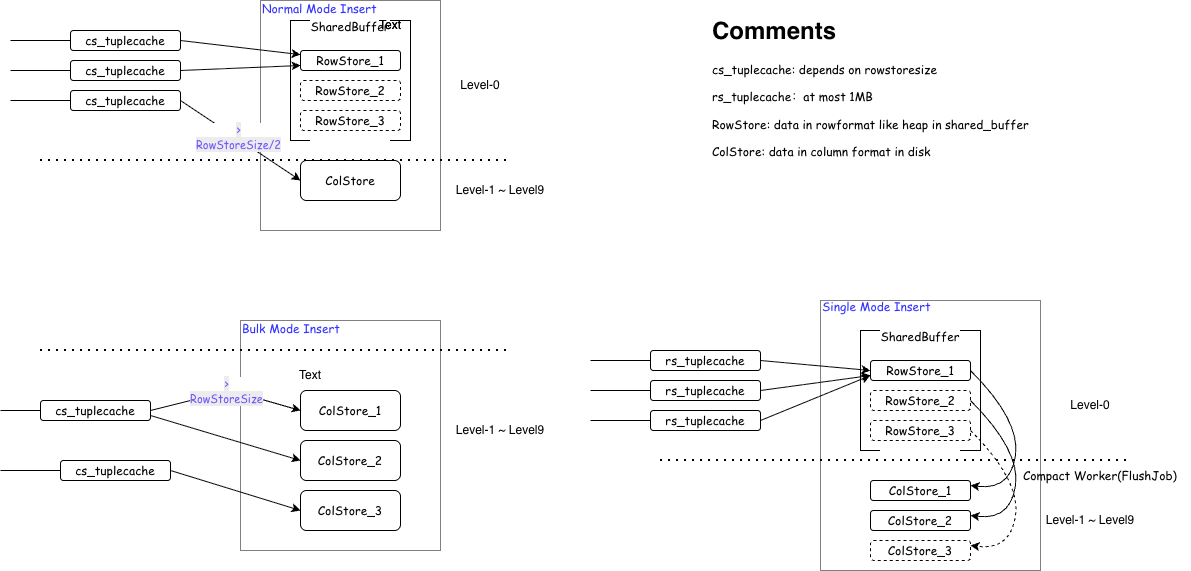
To accommodate different scenario requirements, YMatrix supports three write modes, determined by the table-level parameters prefer_load_mode and rowstore_size:

Write Process for Different Modes
4.1.1 Single

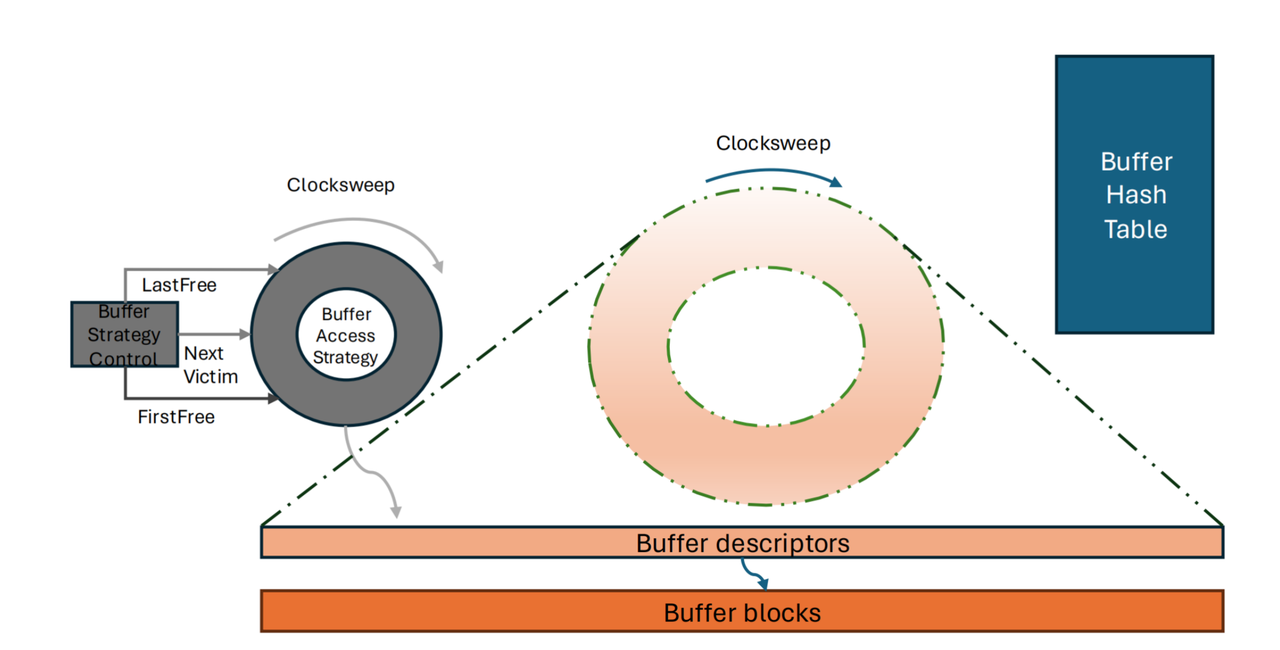
In Single mode, data accumulates up to 1MB in local memory before being directly inserted into RowStore. The entire write process is similar to traditional PostgreSQL Heap writes, with data placed directly in Shared Buffers, the size of which is controlled by the parameter shared_buffers. In Single mode, this parameter can be increased appropriately; otherwise, memory swapping may occur.
Advantages:

  • Minimum insertion latency, minimal memory consumption.

Disadvantages:

  • For large data inserts, data first goes to RowStore, adding an extra merge step.

  • If data cannot be quickly converted to ColumnStore after entering RowStore, the table size (\dt+) may appear large. This can be mitigated by manually running VACUUM and VACUUM FULL before checking.

  • AP query and BRIN query efficiency are not as good as ColumnStore.

  • Due to lack of compression, data and WAL sizes are several times larger than ColumnStore, unsuitable for I/O-constrained environments.

4.1.2 Bulk

In Bulk mode, data is first copied to local memory until it reaches rowstore_size. When it reaches rowstore_size, it is directly converted to ColumnStore and flushed to disk. At the end of the insert, if the local memory hasn't reached rowstore_size, the remaining data is still converted to ColumnStore and flushed to disk.

Advantages:

  • Data is compressed, making it more I/O-friendly.

  • AP query and BRIN query efficiency are better than RowStore.

  • Reduces write amplification.

Disadvantages:

  • Consumes more memory (several times more than RowStore), especially with many partition tables.

  • Insert latency is higher than RowStore.

4.1.3 Normal

Intelligent insertion mode. Data is copied to local memory. When it reaches rowstore_size, it is directly converted to ColumnStore and flushed to disk. At the end of the insert, if the local memory hasn't reached rowstore_size / 2, it is written to the current RowStore; otherwise, it is converted to ColumnStore and flushed to disk. Default mode.

4.1.4 Write Speed Comparison Across Modes

Single Row Insert: pgbench -n -f single_insert.sql -c 1 -j 1 -t 100000 test .

Test Type Transactions per Client Number of Clients Number of Threads Average Latency (ms) TPS (including connections) TPS (excluding connections)
single_insert.sql 100,000 1 1 1.98 505.03 505.06
bulk_insert.sql 100,000 1 1 15.282 65.44 65.44
normal_insert.sql 100,000 1 1 1.968 508.02 508.05

Small Batch Insert: time for i in {1..2000}; do psql test -f batch_insert.sql; done .

Mode Total Time Total Seconds (s) Rows per Second (rows/s)
single 2m27s 147 ≈ 680
normal 2m28s 148 ≈ 676
bulk 4m55s 295 ≈ 339

Large Batch Write (COPY): Generate a CSV file with 50 million rows and use COPY to import it into tables with different modes.

Mode Rows Time Taken (seconds)
bulk 50,000,000 69.287
single 50,000,000 50.868
normal 50,000,000 70.612

Compression Ratio: MARS3 Single mode achieves a compression ratio close to 10x compared to Heap.

Table Name Compression Ratio Storage Savings
fi_voucher 7:01 86%
fi_voucher_b 15:01 93%
aai_voucher 4.5:1 78%
aai_voucher_record 8.9:1 89%

4.1.5 WAL Generation Comparison Across Modes

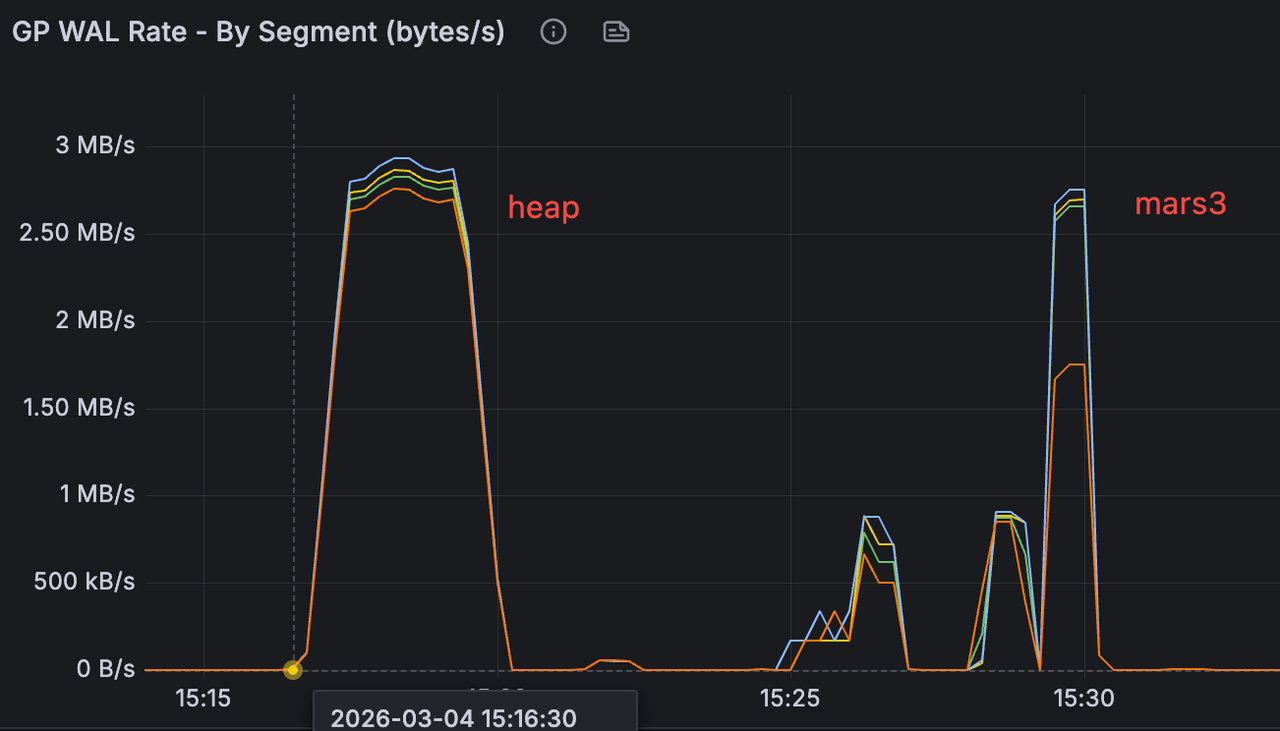
In a specific test scenario inserting the same amount of data, the WAL generation rate was similar across modes, but the total WAL generated by MARS3 was approximately 1/3 of that generated by Heap, significantly reducing storage space required for WAL.
4.2 Read Path Overview

Because compressed Ranges have variable length, the existing Shared Buffers mechanism cannot be used directly. Therefore, a read-only cache supporting variable-length data was designed for queries entering via index scans. Index scans are latency-sensitive, and we use caching to mitigate the read amplification introduced by columnar storage. This cache stores data in a format more friendly to index scans. Since index scans know exactly which tuple is needed, the cache format and reads can quickly locate a specific row.

For MARS3, there is a cache similar to Shared Buffers called varbuffer. Varbuffer is primarily used to optimize index scans. Since ColumnStore reads and writes directly, varbuffer caches decompressed stripe data because data on disk is compressed. If index scans are predominant, this parameter can be adjusted (requires restart).

① Check varbuffer first  
   Hit → Use the decompressed stripe directly (seeing the stripe as it was before compression)

② Miss → Initiate buffer I/O  
       ↓  
   OS cache hit?  
       Yes → Get the compressed stripe (no disk I/O)  
       No → Actual disk read

③ Get the compressed stripe  
   → Decompress  
   → Put into varbuffer
postgres=# show mx_varbuffer_size ;
 mx_varbuffer_size
-------------------
 1GB
(1 row)

4.2.1 Impact of Varbuffer on Index Scans

Theoretically, the larger the varbuffer, the better the index scan performance, while its impact on sequential scans is minimal. Additionally, attention should be paid to the OS cache effect. Before each test, clear the OS cache and restart the database. Build the dataset.

CREATE TABLE t_m3 (
  id   bigint,
  ts   timestamptz,
  v    double precision,
  pad  int
)
USING MARS3
DISTRIBUTED BY (id);

INSERT INTO t_m3
SELECT
  (g % 1000000)::bigint AS id,
  '2026-01-01'::timestamptz + (g || ' seconds')::interval AS ts,
  (random()*1000)::float8 AS v,
  (g % 1000)::int AS pad
FROM generate_series(1, 20000000) g;
ANALYZE t_m3;

CREATE INDEX idx_t_m3_id_ts ON t_m3 (id, ts);
ANALYZE t_m3;

Verification Results

adw=# show mx_varbuffer_size;                                                                                                                                                          
 mx_varbuffer_size                                                                                                                                                                     
-------------------                                                                                                                                                                    
 64MB                                                                                                                                                                                  
(1 row)                                                                                                                                                                                

adw=# \q                                                                                                                                                                               
[mxadmin@sdw ~]$ /usr/bin/time -f "pass1: %e s" bash -c '                                                                                                                              
> for i in $(seq 1 20000); do                                                                                                                                                          
>   psql -X -qAt -c "SELECT v FROM t_m3 WHERE id=$i AND ts='\''2026-01-02 00:00:00+00'\'';" >/dev/null                                                                                 
> done'                                                                                                                                                                                
pass1: 238.07 s


adw=# show mx_varbuffer_size;                                                                                                                                                          
 mx_varbuffer_size                                                                                                                                                                     
-------------------                                                                                                                                                                    
 1GB                                                                                                                                                                                   
(1 row)                                                                                                                                                                                

adw=# \q                                                                                                                                                                               
[mxadmin@sdw ~]$ /usr/bin/time -f "pass2: %e s" bash -c '                                                                                                                              
> for i in $(seq 1 20000); do                                                                                                                                                          
>   psql -X -qAt -c "SELECT v FROM t_m3 WHERE id=$i AND ts='\''2026-01-02 00:00:00+00'\'';" >/dev/null                                                                                 
> done'                                                                                                                                                                                
pass2: 238.72 s 

adw=# select * from t_m3 where ts = '2026-01-02 00:00:00+00';                                                                                                                          
   id   |           ts           |         v         | pad                                                                                                                             
--------+------------------------+-------------------+-----                                                                                                                            
 115200 | 2026-01-02 08:00:00+08 | 681.0068987279756 | 200                                                                                                                             
(1 row)

Because each query hits at most 0 to 1 rows and rarely reuses stripes, no cacheable working set is formed, so the difference between the two is minimal.

Redesign Required to Meet Four Conditions:

  • Index scans are triggered stably.

  • A single query returns a moderate amount of data.

  • Repeated queries repeatedly hit the same set of stripes, forming a hot spot.

  • The size of the hot working set can be tuned to fall between 64MB and 1GB.

  • Due to the OS cache effect, before each verification, echo 3 > /proc/sys/vm/drop_caches must be run to clear the OS cache, and the database must be restarted.

Test Conclusion: Under cold-start conditions (OS page cache cleared and database restarted), executing 1,000 MxVIndexScan aggregation queries on the same hot spot window reduced the total time from 87.986s to 17.514s (approximately 5.02x speedup, 80.1% reduction) when increasing mx_varbuffer_size from 64MB to 1GB. This result indicates that varbuffer capacity has a decisive impact on column data reuse after decompression in MARS3 index scan scenarios; when capacity is insufficient, significant overhead from repeated decompression and cache eviction occurs.

DROP TABLE IF EXISTS t_m3_vb_test;

CREATE TABLE t_m3_vb_test (
    device_id   int,                -- one of the query primary keys (high cardinality)
    ts          timestamptz,        -- time dimension (second column of the index)
    metric_id   smallint,           -- metric ID (low cardinality)
    v1          double precision,   -- commonly used numeric column
    v2          double precision,   -- commonly used numeric column
    v3          double precision,   -- commonly used numeric column
    status      int,                -- status column (low cardinality)
    tag         int                 -- filler column (increases working set size)
)
USING MARS3
DISTRIBUTED BY (device_id);

CREATE INDEX idx_t_m3_vb_test_dev_ts ON t_m3_vb_test (device_id, ts);
ANALYZE t_m3_vb_test;

-- Approximately 30 million rows
INSERT INTO t_m3_vb_test
SELECT
    d.device_id,
    t.ts,
    m.metric_id,
    (random() * 1000)::float8 AS v1,
    (random() * 1000)::float8 AS v2,
    (random() * 1000)::float8 AS v3,
    (random() * 10)::int      AS status,
    (random() * 100000)::int  AS tag
FROM generate_series(1, 100) AS d(device_id)
CROSS JOIN generate_series(
    '2026-01-01 00:00:00+00'::timestamptz,
    '2026-01-01 23:59:59+00'::timestamptz,
    '1 second'::interval
) AS t(ts)
CROSS JOIN generate_series(1, 4) AS m(metric_id);

64 MB varbuffer

Each index scan repeatedly accesses the same set of stripes/ranges. The varbuffer capacity is insufficient to hold the decompressed column data involved in this hot spot window. Consequently, each iteration incurs a significant amount of:

  • Stripe re-reads

  • Re-decompression

  • Re-construction of execution batches

This amplifies CPU and memory overhead.

adw=# show mx_varbuffer_size ;                                                                                                                                                         
 mx_varbuffer_size                                                                                                                                                                     
-------------------                                                                                                                                                                    
 64MB                                                                                                                                                                                  
(1 row)                                                                                                                                                                                

adw=# set enable_seqscan to off;                                                                                                                                                       
SET                                                                                                                                                                                    
adw=# set enable_bitmapscan to off;                                                                                                                                                    
SET                                                                                                                                                                                    
adw=# \timing on                                                                                                                                                                       
Timing is on.                                                                                                                                                                          
adw=# DO $$                                                                                                                                                                            
DECLARE i int;                                                                                                                                                                         
DECLARE s1 float8;                                                                                                                                                                     
DECLARE s2 float8;                                                                                                                                                                     
DECLARE s3 float8;                                                                                                                                                                     
BEGIN                                                                                                                                                                                  
  FOR i IN 1..1000 LOOP                                                                                                                                                                
    SELECT sum(v1), avg(v2), max(v3)                                                                                                                                                   
      INTO s1, s2, s3                                                                                                                                                                  
    FROM t_m3_vb_test                                                                                                                                                                  
    WHERE device_id = 42                                                                                                                                                               
      AND ts >= '2026-01-01 10:00:00+00'                                                                                                                                               
      AND ts <  '2026-01-01 14:00:00+00';                                                                                                                                              
  END LOOP;                                                                                                                                                                            
END$$;                                                                                                                                                                                 
DO                                                                                                                                                                                     
Time: 87986.026 ms (01:27.986)

1 GB varbuffer

With 1GB, the situation changes:

  • The decompressed column data involved in the hot spot window is likely to reside in varbuffer long-term.

  • The first execution completes the warm-up.

  • The subsequent 999 iterations mostly hit the varbuffer.

  • Repeated decompression and column batch preparation are avoided.

Therefore, the overall time is significantly reduced.

adw=# show mx_varbuffer_size ;                                                                                                                                                         
 mx_varbuffer_size                                                                                                                                                                     
-------------------                                                                                                                                                                    
 1GB                                                                                                                                                                                   
(1 row)                                                                                                                                                                                

adw=# set enable_seqscan to off;                                                                                                                                                       
SET                                                                                                                                                                                    
adw=# set enable_bitmapscan to off;                                                                                                                                                    
SET                                                                                                                                                                                    
adw=# \timing on                                                                                                                                                                       
Timing is on.                                                                                                                                                                          
adw=# DO $$                                                                                                                                                                            
DECLARE i int;                                                                                                                                                                         
DECLARE s1 float8;                                                                                                                                                                     
DECLARE s2 float8;                                                                                                                                                                     
DECLARE s3 float8;                                                                                                                                                                     
BEGIN                                                                                                                                                                                  
  FOR i IN 1..1000 LOOP                                                                                                                                                                
    SELECT sum(v1), avg(v2), max(v3)                                                                                                                                                   
      INTO s1, s2, s3                                                                                                                                                                  
    FROM t_m3_vb_test                                                                                                                                                                  
    WHERE device_id = 42                                                                                                                                                               
      AND ts >= '2026-01-01 10:00:00+00'                                                                                                                                               
      AND ts <  '2026-01-01 14:00:00+00';                                                                                                                                              
  END LOOP;                                                                                                                                                                            
END$$;                                                                                                                                                                                 
DO                                                                                                                                                                                     
Time: 17514.349 ms (00:17.514)

4.2.2 Impact of Varbuffer on Sequential Scans

The previous tests manually set enable_seqscan and enable_bitmapscan to force index scans. This time, the parameters are not set, verifying the impact of varbuffer on sequential scans. The test results show negligible difference.

Varbuffer primarily optimizes index-driven random/hot access, not the main sequential scan path.

64 MB varbuffer

adw=# set enable_bitmapscan to off;                                                                                                                                                    
SET                                                                                                                                                                                    
adw=# set enable_indexscan to off;                                                                                                                                                     
SET                                                                                                                                                                                    
adw=# \timing on                                                                                                                                                                       
Timing is on.                                                                                                                                                                          
adw=# DO $$                                                                                                                                                                            
DECLARE i int;                                                                                                                                                                         
DECLARE s1 float8;                                                                                                                                                                     
DECLARE s2 float8;                                                                                                                                                                     
DECLARE s3 float8;                                                                                                                                                                     
BEGIN                                                                                                                                                                                  
  FOR i IN 1..1000 LOOP                                                                                                                                                                
    SELECT sum(v1), avg(v2), max(v3)                                                                                                                                                   
      INTO s1, s2, s3                                                                                                                                                                  
    FROM t_m3_vb_test                                                                                                                                                                  
    WHERE device_id = 42                                                                                                                                                               
      AND ts >= '2026-01-01 10:00:00+00'                                                                                                                                               
      AND ts <  '2026-01-01 14:00:00+00';                                                                                                                                              
  END LOOP;                                                                                                                                                                            
END$$;                                                                                                                                                                                 
DO                                                                                                                                                                                     
Time: 29928.241 ms (00:29.928)

1 GB varbuffer

adw=# set enable_bitmapscan to off;                                                                                                                                                    
SET                                                                                                                                                                                    
adw=# set enable_indexscan to off;                                                                                                                                                     
SET                                                                                                                                                                                    
adw=# show mx_varbuffer_size ;                                                                                                                                                         
 mx_varbuffer_size                                                                                                                                                                     
-------------------                                                                                                                                                                    
 1GB                                                                                                                                                                                   
(1 row)                                                                                                                                                                                

adw=# \timing on                                                                                                                                                                       
Timing is on.                                                                                                                                                                          
adw=# DO $$                                                                                                                                                                            
DECLARE i int;                                                                                                                                                                         
DECLARE s1 float8;                                                                                                                                                                     
DECLARE s2 float8;                                                                                                                                                                     
DECLARE s3 float8;                                                                                                                                                                     
BEGIN                                                                                                                                                                                  
  FOR i IN 1..1000 LOOP                                                                                                                                                                
    SELECT sum(v1), avg(v2), max(v3)                                                                                                                                                   
      INTO s1, s2, s3                                                                                                                                                                  
    FROM t_m3_vb_test                                                                                                                                                                  
    WHERE device_id = 42                                                                                                                                                               
      AND ts >= '2026-01-01 10:00:00+00'                                                                                                                                               
      AND ts <  '2026-01-01 14:00:00+00';                                                                                                                                              
  END LOOP;                                                                                                                                                                            
END$$;                                                                                                                                                                                 
DO                                                                                                                                                                                     
Time: 28216.994 ms (00:28.217) 

4.3 Compression and Performance Impact

Every compress_threshold (default 1200) rows of data is a Range. A Stripe is column data within a Range. Large Stripe data is split into 1MB chunks. Reads may not involve reading a full Range's data.

compress_threshold can affect compression ratio. More data compressed in a batch can potentially yield better compression if there are more repeating patterns.

4.3.1 Impact of compress_threshold on Read Performance

id compress_thresthold=1200 3600 10000 50000
1 8.8032 7.7846 6.6471 6.6824
2 0.981 0.997 2.2284 2.2322
3 3.3512 3.3143 3.3184 3.3177
4 7.7059 7.7326 6.6034 5.5994
5 5.5732 5.5042 5.5939 6.6330
6 0.4780 0.3800 0.5450 0.5450
7 1.1908 1.1917 2.2172 2.2222
8 3.3602 3.3129 3.3018 3.3227
9 8.8429 7.7400 7.7751 7.7795
10 3.3835 4.4239 5.5496 5.5499
11 0.8450 0.7430 2.2307 2.2299
12 1.1998 1.1887 2.2164 2.2138
13 6.6514 6.6351 6.6784 6.6424
14 0.8370 0.7760 1.1364 1.1275
15 1.1436 1.1359 1.1830 1.1783
16 1.1768 1.1787 2.2673 2.2757
17 9.9419 8.8705 8.8922 8.8771
18 11.11337 11.11522 10.10384 10.10647
19 4.4792 3.3942 4.4918 4.4670
20 2.2668 2.2389 3.3475 3.3346
21 11.11391 10.10633 11.11190 10.10742
22 3.3009 2.2864 3.3720 3.3377
sum 97.73958 92.05015 100.81134 99.78189

4.3.2 Impact of compress_threshold on Write Performance

Test Scenario compress_threshold 1200 3600 10000
Write Performance Partitioned Table (rows/s) 852,334 919,031 1,055,371
Write Performance Non-Partitioned Table (rows/s) 991,463 1,033,751 1,054,292
Query Performance time_bucket=1h (1-day range) 357ms 342ms 333ms
Query Performance time_bucket=1d (1-month range) 7,384ms 6,312ms 6,008ms
Query Performance time_bucket=30d (1-year range) 94,278ms 75,101ms 68,184ms
Query Performance Point Query Scenario 19.416 ms 20.043 ms 23.692 ms

4.3.3 Index Compression

Index compression architecture is described in the [mars3btree] section.

CREATE INDEX idx_name ON table_name
USING mars3btree (column_list)
WITH (
  compresstype = 'lz4',   -- compression algorithm
  compresslevel = 1,      -- compression level
  compressctid = true,    -- whether to compress CTID column
  encodechain = '',       -- encoding chain
  minmax = true           -- enable min/max optimization
);
  • compresstype: Supports lz4, zstd, mxcustom. Default lz4. lz4: fast compression/decompression, medium ratio. zstd: high compression ratio, slightly slower. mxcustom: requires encodechain.

  • compresslevel: Supports 1-9. Default 1. For query-intensive workloads, suggest 1-3 (prioritize decompression speed). For storage-sensitive, suggest 6-9 (prioritize compression ratio).

  • compressctid: Default true. CTID column compression ratio is typically high.

In a customer scenario, after enabling index compression:

The impact on the TOB cluster was minimal, with node CPU and MEM showing little change, while saving 24% of Ymatrix partition storage space. The effect on the TOC cluster was significant, saving 63% of Ymatrix partition storage space at the cost of some CPU and MEM usage. For queries retrieving one day of GPS data for 50 vehicles, the service throughput with index compression enabled was 3.3 times that without index compression. For queries retrieving three days of GPS data for 50 vehicles, the service throughput with index compression enabled was 1.1 times that without index compression.

4.3.4 Impact of Sort Keys on Compression

As mentioned earlier, compression (whether zstd/lz4 or encodings like RLE/dict/bitpack) relies on a core fact: the more regular the data within the same block/stripe, the better the compression. lz4/zstd rely on repeated substrings/repeating patterns. After sorting, the combination of fields within the same block becomes more similar, especially for wide tables. When data from similar entities or similar time periods clusters within the same stripe, the value range within the block converges, repetitions and run-length repetitions increase, dictionary size decreases, and the bit width for delta/bitpacking is reduced, thereby enhancing the effectiveness of both encoding and general compression.

adw=# CREATE TABLE t_sort_good (                                                                                                                                                                                                                            
  device_id   int NOT NULL,                                                                                                                                                                                                                                 
  ts          timestamptz NOT NULL,                                                                                                                                                                                                                         
  site_id     int NOT NULL,                                                                                                                                                                                                                                 
  status      smallint NOT NULL,                                                                                                                                                                                                                            
  v1          double precision NOT NULL,                                                                                                                                                                                                                    
  v2          double precision NOT NULL,                                                                                                                                                                                                                    
  attrs       jsonb NOT NULL                                                                                                                                                                                                                                
)                                                                                                                                                                                                                                                           
USING MARS3                                                                                                                                                                                                                                                 
WITH (compresstype=zstd,compresslevel=3,mars3options='prefer_load_mode=bulk')                                                                                                                                                                               
ORDER BY (device_id, ts);                                                                                                                                                                                                                                   
NOTICE:  Table doesn't have 'DISTRIBUTED BY' clause -- Using column named 'device_id' as the Greenplum Database data distribution key for this table.                                                                                                       
HINT:  The 'DISTRIBUTED BY' clause determines the distribution of data. Make sure column(s) chosen are the optimal data distribution key to minimize skew.                                                                                                  
CREATE TABLE 

adw=# CREATE TABLE t_sort_bad (                                                                                                                                                                                                                             
  device_id   int NOT NULL,                                                                                                                                                                                                                                 
  ts          timestamptz NOT NULL,                                                                                                                                                                                                                         
  site_id     int NOT NULL,                                                                                                                                                                                                                                 
  status      smallint NOT NULL,                                                                                                                                                                                                                            
  v1          double precision NOT NULL,                                                                                                                                                                                                                    
  v2          double precision NOT NULL,                                                                                                                                                                                                                    
  attrs       jsonb NOT NULL                                                                                                                                                                                                                                
)                                                                                                                                                                                                                                                           
USING MARS3                                                                                                                                                                                                                                                 
WITH (compresstype=zstd,compresslevel=3,mars3options='prefer_load_mode=bulk')                                                                                                                                                                               
ORDER BY (ts, device_id);                                                                                                                                                                                                                                   
NOTICE:  Table doesn't have 'DISTRIBUTED BY' clause -- Using column named 'device_id' as the Greenplum Database data distribution key for this table.                                                                                                       
HINT:  The 'DISTRIBUTED BY' clause determines the distribution of data. Make sure column(s) chosen are the optimal data distribution key to minimize skew.                                                                                                  
CREATE TABLE

Then generate the raw data source and insert data into both tables simultaneously.

DROP TABLE IF EXISTS t_src;
CREATE UNLOGGED TABLE t_src AS
WITH
  dev AS (
    SELECT d AS device_id,
           (d % 200) AS site_id,
           (1000 + (d % 500))::double precision AS base
    FROM generate_series(1, 10000) AS d
  ),
  pts AS (
    SELECT device_id, site_id, base,
           g AS seq,
           (timestamp '2026-01-01' + (g || ' seconds')::interval) AS ts
    FROM dev
    CROSS JOIN generate_series(1, 1000) AS g
  )
SELECT
  device_id,
  ts,
  site_id,
  -- status: changes every 300 seconds, forming long runs
  ((seq / 300) % 4)::smallint AS status,
  -- v1/v2: device baseline + small fluctuations
  (base + (seq % 10) * 0.1)::double precision AS v1,
  (base * 0.1 + (seq % 20) * 0.01)::double precision AS v2,
  -- attrs: key patterns are highly similar, but values vary by device/time
  jsonb_build_object(
    'fw',  '1.2.' || (device_id % 10),
    'model', 'm' || (device_id % 50),
    'tag',  'S' || site_id,
    'k',    seq % 5
  ) AS attrs
FROM pts;

INSERT INTO t_sort_good SELECT * FROM t_src;
INSERT INTO t_sort_bad  SELECT * FROM t_src;

To ensure data accuracy, run VACUUM FULL and VACUUM multiple times after insertion.

adw=# select segid,level,total_nruns,visible_nruns,invisible_nruns,level_size from matrixts_internal.mars3_level_stats('t_sort_good') where level_size  '0 bytes';                                                                                        
 segid | level | total_nruns | visible_nruns | invisible_nruns | level_size                                                                                                                                                                                 
-------+-------+-------------+---------------+-----------------+------------                                                                                                                                                                                
     0 |     1 |           1 |             1 |               0 | 8839 kB                                                                                                                                                                                    
     1 |     1 |           1 |             1 |               0 | 8933 kB                                                                                                                                                                                    
     3 |     1 |           1 |             1 |               0 | 8552 kB                                                                                                                                                                                    
     2 |     1 |           1 |             1 |               0 | 8728 kB                                                                                                                                                                                    
(4 rows)                                                                                                                                                                                                                                                    

adw=# select segid,level,total_nruns,visible_nruns,invisible_nruns,level_size from matrixts_internal.mars3_level_stats('t_sort_bad') where level_size  '0 bytes';                                                                                         
 segid | level | total_nruns | visible_nruns | invisible_nruns | level_size                                                                                                                                                                                 
-------+-------+-------------+---------------+-----------------+------------                                                                                                                                                                                
     0 |     2 |           1 |             1 |               0 | 26 MB                                                                                                                                                                                      
     1 |     2 |           1 |             1 |               0 | 26 MB                                                                                                                                                                                      
     3 |     2 |           1 |             1 |               0 | 25 MB                                                                                                                                                                                      
     2 |     2 |           1 |             1 |               0 | 25 MB                                                                                                                                                                                      
(4 rows)                                                                                                                                                                                                                                                  

adw=# \dt+ t_sort_bad                                                                                                                                                                                                                                       
                           List of relations                                                                                                                                                                                                                
 Schema |    Name    | Type  |  Owner  | Storage |  Size  | Description                                                                                                                                                                                     
--------+------------+-------+---------+---------+--------+-------------                                                                                                                                                                                    
 public | t_sort_bad | table | mxadmin | mars3   | 103 MB |                                                                                                                                                                                                 
(1 row)                                                                                                                                                                                                                                                     

adw=# \dt+ t_sort_good                                                                                                                                                                                                                                      
                           List of relations                                                                                                                                                                                                                
 Schema |    Name     | Type  |  Owner  | Storage | Size  | Description                                                                                                                                                                                     
--------+-------------+-------+---------+---------+-------+-------------                                                                                                                                                                                    
 public | t_sort_good | table | mxadmin | mars3   | 35 MB |                                                                                                                                                                                                 
(1 row)   

adw=# select * from t_sort_good limit 10;                                                                                                                                                                                                                   
 device_id |           ts           | site_id | status |   v1   |         v2         |                        attrs                                                                                                                                         
-----------+------------------------+---------+--------+--------+--------------------+-----------------------------------------------------                                                                                                                 
         3 | 2026-01-01 00:00:01+08 |       3 |      0 | 1003.1 | 100.31000000000002 | {"k": 1, "fw": "1.2.3", "tag": "S3", "model": "m3"}                                                                                                                  
         3 | 2026-01-01 00:00:02+08 |       3 |      0 | 1003.2 | 100.32000000000001 | {"k": 2, "fw": "1.2.3", "tag": "S3", "model": "m3"}                                                                                                                  
         3 | 2026-01-01 00:00:03+08 |       3 |      0 | 1003.3 | 100.33000000000001 | {"k": 3, "fw": "1.2.3", "tag": "S3", "model": "m3"}                                                                                                                  
         3 | 2026-01-01 00:00:04+08 |       3 |      0 | 1003.4 | 100.34000000000002 | {"k": 4, "fw": "1.2.3", "tag": "S3", "model": "m3"}                                                                                                                  
         3 | 2026-01-01 00:00:05+08 |       3 |      0 | 1003.5 | 100.35000000000001 | {"k": 0, "fw": "1.2.3", "tag": "S3", "model": "m3"}                                                                                                                  
         3 | 2026-01-01 00:00:06+08 |       3 |      0 | 1003.6 | 100.36000000000001 | {"k": 1, "fw": "1.2.3", "tag": "S3", "model": "m3"}                                                                                                                  
         3 | 2026-01-01 00:00:07+08 |       3 |      0 | 1003.7 |             100.37 | {"k": 2, "fw": "1.2.3", "tag": "S3", "model": "m3"}                                                                                                                  
         3 | 2026-01-01 00:00:08+08 |       3 |      0 | 1003.8 | 100.38000000000001 | {"k": 3, "fw": "1.2.3", "tag": "S3", "model": "m3"}                                                                                                                  
         3 | 2026-01-01 00:00:09+08 |       3 |      0 | 1003.9 | 100.39000000000001 | {"k": 4, "fw": "1.2.3", "tag": "S3", "model": "m3"}                                                                                                                  
         3 | 2026-01-01 00:00:10+08 |       3 |      0 |   1003 |              100.4 | {"k": 0, "fw": "1.2.3", "tag": "S3", "model": "m3"}                                                                                                                  
(10 rows)                                                                                                                                                                                                                                                   

adw=# select * from t_sort_bad limit 10;                                                                                                                                                                                                                    
 device_id |           ts           | site_id | status |   v1   |         v2         |                         attrs                                                                                                                                        
-----------+------------------------+---------+--------+--------+--------------------+-------------------------------------------------------                                                                                                               
         1 | 2026-01-01 00:00:01+08 |       1 |      0 | 1001.1 | 100.11000000000001 | {"k": 1, "fw": "1.2.1", "tag": "S1", "model": "m1"}                                                                                                                  
        12 | 2026-01-01 00:00:01+08 |      12 |      0 | 1012.1 | 101.21000000000001 | {"k": 1, "fw": "1.2.2", "tag": "S12", "model": "m12"}                                                                                                                
        15 | 2026-01-01 00:00:01+08 |      15 |      0 | 1015.1 |             101.51 | {"k": 1, "fw": "1.2.5", "tag": "S15", "model": "m15"}                                                                                                                
        20 | 2026-01-01 00:00:01+08 |      20 |      0 | 1020.1 |             102.01 | {"k": 1, "fw": "1.2.0", "tag": "S20", "model": "m20"}                                                                                                                
        23 | 2026-01-01 00:00:01+08 |      23 |      0 | 1023.1 | 102.31000000000002 | {"k": 1, "fw": "1.2.3", "tag": "S23", "model": "m23"}                                                                                                                
        35 | 2026-01-01 00:00:01+08 |      35 |      0 | 1035.1 |             103.51 | {"k": 1, "fw": "1.2.5", "tag": "S35", "model": "m35"}                                                                                                                
        38 | 2026-01-01 00:00:01+08 |      38 |      0 | 1038.1 | 103.81000000000002 | {"k": 1, "fw": "1.2.8", "tag": "S38", "model": "m38"}                                                                                                                
        40 | 2026-01-01 00:00:01+08 |      40 |      0 | 1040.1 |             104.01 | {"k": 1, "fw": "1.2.0", "tag": "S40", "model": "m40"}                                                                                                                
        44 | 2026-01-01 00:00:01+08 |      44 |      0 | 1044.1 | 104.41000000000001 | {"k": 1, "fw": "1.2.4", "tag": "S44", "model": "m44"}                                                                                                                
        47 | 2026-01-01 00:00:01+08 |      47 |      0 | 1047.1 | 104.71000000000001 | {"k": 1, "fw": "1.2.7", "tag": "S47", "model": "m47"}                                                                                                                
(10 rows)

In short:

t_sort_good groups similar data together, so each batch written to disk is more regular and repetitive, allowing the compressor to work more effectively. t_sort_bad mixes completely different data together, so each batch written to disk is more varied and random, making compression difficult.

  • With the same amount of data, only the sort key differs:

    • t_sort_good total size: 35 MB
    • t_sort_bad total size: 103 MB (approximately 3 times larger)
  • From the run/level statistics: each segment has only one run, but:

    • For t_sort_good, the run is at level 1, approximately 8.5–8.9 MB per segment
    • For t_sort_bad, the run is at level 2, approximately 25–26 MB per segment

For t_sort_good, ordering by (device_id, ts) → similar clustering → compression-friendly. Within the same stripe/block, data typically represents "a continuous period of time for the same device." This results in:

  • Columns like device_id/site_id/status exhibit long runs of repetition (well-suited for RLE/dictionary encoding)

  • Columns that change slowly over time, like ts and v1/v2, have small deltas within the block (well-suited for delta/bitpacking)

  • The key patterns in attrs (jsonb) are highly similar within the same device (also more favorable for zstd/lz4)

Therefore, with the same number of rows, the physical footprint is significantly smaller.

For t_sort_bad, ordering by (ts, device_id) → device mixing → compression-unfriendly. At the same point in time, a large number of devices are mixed together, causing:

  • device_id changes almost every row (larger dictionary, RLE run length close to 1)

  • site_id/status are also scattered (run-length patterns are broken)

  • The combination patterns in attrs are more varied (fewer repeating fragments)

  • Even though ts is increasing, the "randomness" of other columns negates the overall compression benefit

Thus, the compression ratio significantly degrades, making the physical size 3x larger, which is entirely normal.

In other words: a poor sort key not only results in larger storage but also makes management more difficult, stabilizing only at higher levels.

In MARS3, the sort key determines the similarity of data within storage units (runs/Stripes). When similar data clusters together, the value range within blocks is narrower, repetitions are more concentrated, and dictionary/RLE/delta encoding along with general compression can fully realize their potential, ultimately achieving a smaller physical footprint. Conversely, when the sort key causes data to be mixed, the distribution within blocks is more scattered, repetitions are broken up, and compression and encoding efficiency significantly decline, potentially even increasing the difficulty and cost of background maintenance.

5. Updates and Deletes

5.1 Unique Mode

Unique Mode is a mode provided by MARS3 for specific write models. It transforms the need to "update a specific record" into "insert a new record again based on the unique key." The engine automatically handles the replacement of old and new versions for the same key value. Its core value is to allow businesses to express update semantics in high-frequency write scenarios using a simpler, more uniform write operation (INSERT), reducing the use and cost of explicit UPDATE, and making data organization more controllable under continuous writes.

Applicable Scenarios:

  • Continuously writing the latest state based on an entity key (strong entity dimension like device/vehicle/user/order, repeatedly writing the latest value for the same key).

  • High-frequency writes, small batches.

  • Queries primarily focused on the latest value/snapshot (e.g., latest status dashboards, latest alerts, latest metrics panels).

  • No reliance on physical delete semantics.

5.1.1 Unique Mode vs. Upsert

In Unique Mode, the unique key is defined by the sort key ORDER BY (...) used when creating the table. When you insert new data with the same Unique Key as an existing record, the engine treats this as an update to the data associated with that key. No explicit UPDATE is needed; simply INSERT to complete the update semantics. Unlike traditional upsert (INSERT ... ON CONFLICT), Unique Mode uses read-time merging. Data is still written to storage during writes. During reads, the correct (latest) data is ensured through version chains and visibility rules, and duplicates are removed via compaction. Upsert uses write-time merging, checking for potential conflicts at write time, incurring additional write overhead.

This pre-check avoids the overhead of inserting the tuple into the heap only to delete it later if the tuple is duplicate. HEAP_INSERT_IS_SPECULATIVE refers to the so-called "speculative insertion" — if a conflict is detected, it is directly aborted without needing to cancel the entire transaction. Other sessions can wait for the speculative insertion to be confirmed, turning it into a regular tuple, or to be canceled.

Therefore, the write efficiency of Unique Mode is significantly higher than traditional upsert. Tests indicate Unique Mode performance is approximately 1.5 times that of traditional upsert.

5.1.2 Handling of JSONB

In the scenario where the same key is written again in Unique Mode, scalar columns follow the default behavior of new value overwriting old value. However, when a column is of type JSONB, the engine supports incremental merge semantics: the new JSONB value is not written directly but is obtained by: new_jsonb = jsonb_concat(old_jsonb, incoming_jsonb). The database internally calls jsonb_concat to perform the merge.

For example:

postgres=# SELECT jsonb_concat('[1,2]'::jsonb, '[2,3]'::jsonb);                                                                                                                                                                                             
 jsonb_concat                                                                                                                                                                                                                                               
--------------                                                                                                                                                                                                                                              
 [1, 2, 2, 3]                                                                                                                                                                                                                                               
(1 row)                                                                                                                                                                                                                                                     

postgres=# SELECT jsonb_concat('{"k":1,"x":2}'::jsonb, '{"k":null}'::jsonb);                                                                                                                                                                                
    jsonb_concat                                                                                                                                                                                                                                            
---------------------                                                                                                                                                                                                                                       
 {"k": null, "x": 2}                                                                                                                                                                                                                                        
(1 row)                                                                                                                                                                                                                                                     

postgres=# SELECT jsonb_concat('{"a":1,"b":2}'::jsonb, '{"b":99,"c":3}'::jsonb);                                                                                                                                                                            
       jsonb_concat                                                                                                                                                                                                                                         
---------------------------                                                                                                                                                                                                                                 
 {"a": 1, "b": 99, "c": 3}                                                                                                                                                                                                                                  
(1 row) 

This allows businesses using JSONB for dynamic attributes, extension fields, tags, etc., to only write incremental JSONB data. The engine performs the merge, avoiding the complexity and concurrency issues of reading the old value, merging, and writing back from the application layer.

5.1.3 Risks and Best Practices

  • Idempotency Risk with Array Merges: JSONB array concatenation does not deduplicate. If writes are retried or replayed, duplicate elements can accumulate. Avoid long-term appending of event details into arrays. For idempotency, consider introducing an event_id and ensuring non-duplication at the upper layer, or use object/map structures with key overwrites.

  • JSONB Growth Management: JSONB merges can cause fields to grow gradually, potentially increasing read costs and background maintenance pressure. Implement capacity management for JSONB (trimming, splitting tables, bucketing, retaining only recent N entries, etc.).

  • NULL is NOT Deletion: {"k": null} sets k to null; it does not delete the key. If deletion semantics are needed, alternative designs are required (e.g., dedicated flag fields, separate deletion table, business-level conventions).

5.2 UPDATE/DELETE Implementation Strategy

Why is UpdateChain needed? To ensure correctness when updating the same row concurrently. For PG Heap, an update is not an in-place modification. Instead, the old tuple is marked deleted, a new tuple is inserted, and a ctid link points from the old version to the new one, forming an update chain.
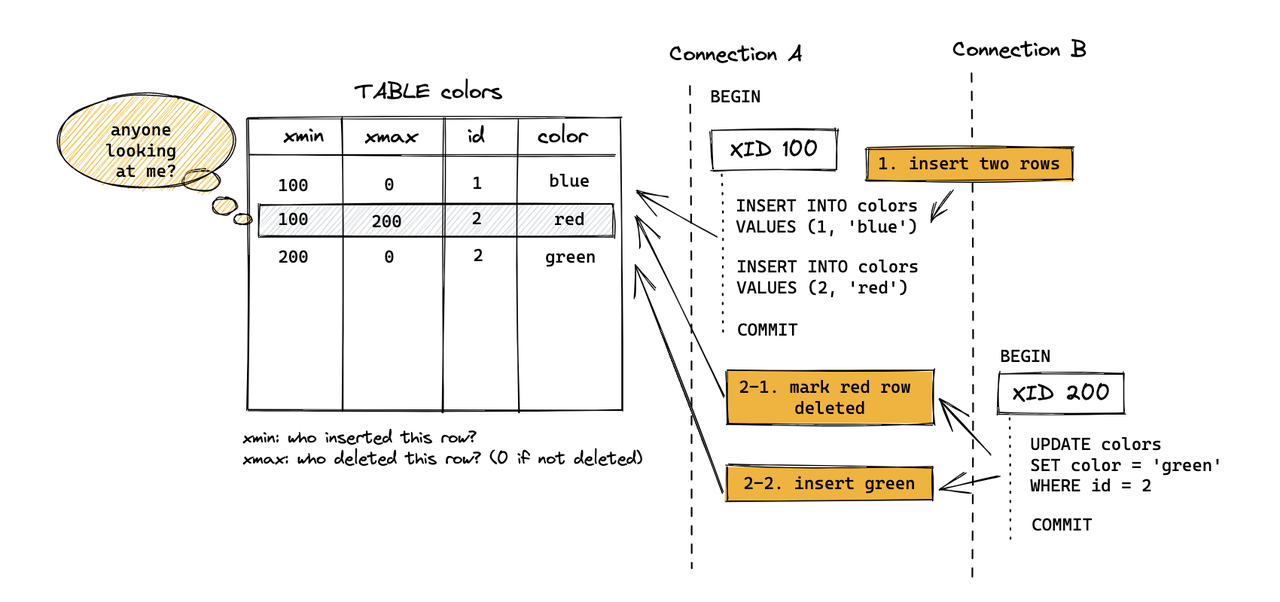
For MARS3, deletes/updates are not handled by writing xmax into the tuple header as in Heap. Instead, similar "delete/update markers" are written to the Delta file. Additionally, to ensure this information is not lost after compaction/flush, a Link file is also required. The xmax/deletion information that Heap stores is kept in Delta for MARS3, and Link ensures that delete information is not lost during the compaction process.

Therefore,

  • Heap: The version chain primarily relies on the tuple header + ctid chain (the version pointer is embedded within the data itself).

  • MARS3: Versioning/deletion semantics are externalized to an auxiliary structure consisting of Delta + Link. Consequently, correctness depends not only on the data files but also on ensuring that Delta/Link are not lost, corrupted, or broken during flush/compaction/vacuum.

In early versions, MARS3 would directly abort with an error when encountering concurrent updates to the same row, as there was no UpdateChain support to ensure correct concurrent results. After introducing UpdateChain, TupleLock is used to lock the logical row, and the latest version is located by traversing the update chain, allowing concurrent updates to proceed sequentially, thereby ensuring the correctness of Update semantics.

5.3 Garbage Collection and Space Reclamation

Similar to PostgreSQL, updates and deletes in YMatrix do not operate on the original data space in-place. Instead, they use a multi-version approach for tuples:

  • MARS3's updates and deletes are not in-place modifications. They rely on DELTA files and version information to mask old data, controlling visibility.

  • DELETE operations are recorded in the DELTA file of the corresponding Run. The data is physically removed only when the Run is merged.

  • UPDATE operations are implemented as a delete of the original data followed by an insert of a new row.

Dead tuples (invisible runs) generated during updates and deletes are periodically cleaned by the autovacuum background process. They can also be cleaned manually with VACUUM. During compaction, as smaller Runs are merged into a new, larger Run, invisible runs are also cleaned up. VACUUM FULL goes a step further: it merges multiple smaller Runs into a larger one. If no new writes occur, running VACUUM FULL typically merges batches as much as possible until no further merges are possible. The size of the remaining runs will be approximately the set max_runsize value.

In short:

  • VACUUM: Flushes RowStore data and removes invisible runs.

  • VACUUM FULL: Performs VACUUM operations and additionally performs merges.