MARS3 is a self-developed LSM-Tree based storage engine for YMatrix. It employs a hybrid row-column architecture, introducing a "row-first, column-later" dual-storage path on top of traditional LSM structures. This design inherits the write-friendly characteristics of row stores while retaining the high-performance analytical query capabilities of column stores. MARS3 supports features such as encoding chain compression, data updates and deletions, MVCC mechanisms, BRIN indexes, and hybrid storage, satisfying the requirements of both Analytical Processing (AP) and Transactional Processing (TP) scenarios.
MARS3 supports data updates and deletions via UPDATE (except in Unique Mode) and DELETE clauses.
It also supports adding or dropping columns and accommodates COPY and pg_dump operations.
For each individual MARS3 table, data is stored internally using an LSM Tree structure. The LSM Tree (Log Structured Merge Tree) is a hierarchical, ordered, disk-oriented data structure. Its core philosophy is to fully leverage disk performance by performing batch sequential writes, which offers significantly higher performance than random writes.
The internal principle diagram of MARS3 is shown below:
_1688719823.png)
Data stored within MARS3 is ordered. A continuous sequence of ordered data is referred to as a Run.
Runs are categorized into two types: Row Store Runs and Column Store Runs. Data inserted for high-speed writing is initially stored as Row Store Runs. Subsequently, these are converted into Column Store Runs to facilitate reading and compression.
Each individual Run has a size limit defined by:
max_runsize, which specifies the maximum size of a single Run during table creation. The maximum value is 16384 MB.4096 MB.matrixts_internal.mars3_files to view the extension files and incremental files of a MARS3 table.select * from matrixts_internal.mars3_files('test');These files primarily include DATA, LINK, FSM, and DELTA. If indexes exist on the table, corresponding INDEX files will also be present.
MARS3 organizes data based on the LSM-Tree model. Individual Run files are organized into Levels, with a maximum of 10 levels: L0, L1, L2, ..., L9.
Compaction (merging) is triggered when the number of Runs in a level reaches a certain threshold or when the total size of multiple Runs in the same level exceeds a specific limit. Once merged into a single Run, it is promoted to a higher level. To accelerate Run promotion, multiple merge tasks can run concurrently within the same level.
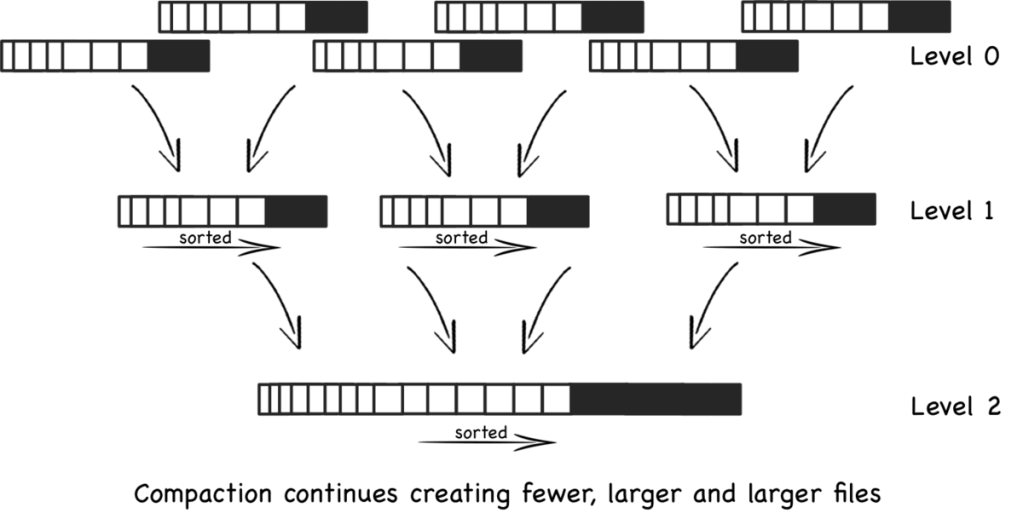
In YMatrix, a set of background merge processes periodically checks the status of various tables and executes merge operations.
YMatrix provides the utility function matrixts_internal.mars3_level_stats to view the status of each level within a MARS3 table.
select * from matrixts_internal.mars3_level_stats('test') limit 10;This operation is highly useful for assessing table health, such as verifying if Runs are merging as expected, checking for excessive invisible Runs, and ensuring Run counts remain within normal ranges.
As a general rule of thumb:
level = 0, if the number of Runs exceeds 3, the status is considered unhealthy.level = 1, if the number of Runs exceeds 50, the status is considered unhealthy.level > 1, if the number of Runs exceeds 10, the status is considered unhealthy.Column stores perform direct reads and writes without a buffer layer like Shared Buffers or page flushing mechanisms.
Every compress_threshold rows of data (default is 1200) constitute a Range. A contiguous block of data for a specific column within a Range (containing compress_threshold rows) is called a Stripe.
If a column's data is particularly large, the Stripe is split into several 1MB chunks. During reads, the entire compress_threshold amount of data is not fetched at once.
RUN
 └── range (split by rows, default 1 range per 1200 rows)
      ├── column1 stripe (1200 datum)
      ├── column2 stripe (1200 datum)
      ├── column3 stripe (1200 datum)
└── ...INSERT and then flushed to Runs in the L0 level.prefer_load_mode and rowstore_size. See the Configuration Parameters section below for details:Normal: Indicates standard mode. New data is first written to Row Store Runs in the L0 level. Once accumulated to rowstore_size, it is moved to Column Store Runs in the L1 level. Compared to Bulk mode, this involves one additional I/O operation. Column store conversion changes from synchronous to asynchronous. This mode is suitable for high-frequency, small-batch write scenarios where I/O capacity is sufficient and latency sensitivity is high.Bulk: Batch loading mode. Suitable for low-frequency, large-batch write scenarios. Data is written directly to Column Store Runs in the L1 level. Compared to Normal mode, this reduces I/O by one step, and column store conversion becomes synchronous. This mode is suitable for low-frequency, large-batch data writes where I/O capacity is limited and latency is less critical.Single: Data is inserted directly into the rowstore, and tuples are placed directly into Shared Buffers.For more detailed information, refer to Write Path Overview.
Currently, MARS3 supports BRIN and BTREE indexes.
Note!
For MARS3 tables, a maximum of 16 indexes are allowed per table (regardless of whether they are on the same column, or whether they are BRIN or BTREE). MARS3 tables support onlymars3_brinandmars3_btreeindexes.CREATE INDEX CONCURRENTLYis currently not supported on MARS3 tables.
BRIN Indexes
mars3_brin and mars3_default_brin indexes, and supports deleting and adding BRIN indexes.CREATE INDEX USING BRIN (which only benefits Index Scans), Sequential Scans can also benefit from Default Brin, significantly improving query efficiency. Note that Default Brin does not consume index slots; even with a Default Brin, you can still create up to 16 additional indexes.| mars3_brin | mars3_default_brin | |
|---|---|---|
| Creation Method | Manual creation required | Automatically created; no manual action needed |
| Query Support | Filters data only during IndexScan | Filters data during both IndexScan and SeqScan |
| Technical Version | brinV2 | brinV2 |
| Parameterized Query | Supports parameterized queries (param-IndexScan) | Supports parameterized queries (param-SeqScan) |
BTREE Indexes
BTREE indexes are a general-purpose index type based on a balanced multi-way tree structure. By organizing index nodes in key-value order, they enable fast and precise positioning of single rows or small data ranges. Query complexity remains stable at O(logN), supporting both equality queries and efficient range scans and sorting operations. Since they do not rely on the physical distribution of data, BTREE indexes exhibit strong stability in high-concurrency transaction processing scenarios. They are the default choice for primary keys, unique constraints, and highly selective queries. However, they are not suitable for low-selectivity columns or wide-range scans on large tables.
mars3btree is the dedicated B-tree implementation within the MARS3 storage engine. The internal pages of the index remain standard B-tree pages. mars3btree supports two types:
NORMAL: Standard row-style B-tree (used for RowStore); uncompressed.COMPRESSED: Column-style compressed B-tree (used for ColumnStore); compressed.The sort key is a core design element determining whether the engine can achieve optimal scan efficiency and long-term stability. Ordered data combined with reliable block-level metadata significantly boosts scan efficiency. A well-chosen sort key ensures stronger locality within Runs and at higher levels, allowing query filter conditions to match continuous ranges more effectively and enabling efficient skipping. Conversely, an unreasonable sort key results in scattered data distribution; filter conditions fail to converge the scan range, causing the system to behave as if it were performing a full scan despite having indexes or metadata.
COLLATE C to that column can accelerate sorting.For more details on sort keys and selection principles, see Sort Keys and Data Locality.
Starting from version 6.8.2, MARS3 uses the typed encoder as the default data compression method. If compresstype is not specified when a table is created, this method is used. You can also explicitly set compresstype=auto to use the typed encoder. The typed encoder dynamically selects the most suitable encoding method based on the column type and the characteristics of each data block, without additional intervention.
Use the automode parameter to specify the typed encoder priority:
automode=1: prioritizes compression ratio.automode=2: prioritizes encoding and decoding speed. The default value is 2.The typed encoder has the following characteristics:
lz4 and zstd.The typed encoder currently supports only the following types:
smallint, integer, bigintdate, time, timestamp, timestamptztext, varcharnumeric, only when fixed precision is defined on the columnfloatFor other types, MARS3 uses zstd level 3 for compression.
For more information on the impact of compression on performance, refer to Compression and Performance Impact.
DELETE command. Deletions are recorded in the Delta file of the corresponding Run and are physically removed only during Run compaction.UPDATE command. An update first deletes the original data and then inserts a new record.DELETE. Explicit use of the UPDATE clause is not required; simply executing an INSERT clause automatically completes the operation. To update a specific record identified by a Unique Key (the specific key values corresponding to the sort key defined at table creation), simply insert a new record with the same Unique Key. For example, CREATE TABLE mars3_t(c1 int NOT NULL, c2 int) USING MARS3 WITH (uniquemode=true) ORDER BY (c1, c2);, where the Unique Key is (c1, c2).Note!
If Unique Mode is enabled, the first field in theORDER BYclause must be defined with aNOT NULLconstraint.
For more technical details, see Updates and Deletes.
For more technical details, see Background Governance.
Dead data. Alternatively, you can plan to regularly use VACUUM to clean up Dead data.MARS3 Bucket is a storage-layer parallel execution optimization mechanism designed by YMatrix for parallel scan scenarios within the MPP architecture. By organizing data into multiple logical buckets based on the hash of the distribution key during the write phase, it ensures that data with the same distribution key is processed by the same worker during parallel scans. This preserves data distribution semantics (locus), avoids unnecessary data redistribution (Motion), and achieves a performance leap from "scanning faster" to "computing more locally."
create table foo (c1 int, c2 int) using mars3 with (mars3options='nbuckets = 2');Valid values for nbuckets range from 1 to 128. The default value is 1, indicating a single bucket (i.e., no bucketing is performed). Enable Bucket only for large tables that benefit from parallel scans. Bucket relies on hash distribution semantics, so it has no practical benefit for non-hash-distributed tables. Unique Mode and continuous views do not support Bucket mode. Changing nbuckets is a rewrite-level change, so decide the value at table creation whenever possible.
For more technical details, see MARS3 Bucket Technical Deep Dive.
Provided the matrixts extension has been created, the simplest way to create a table is to add the USING clause and append the ORDER BY clause to the CREATE TABLE statement. Extended examples can be found in Table Design Best Practices.
=# CREATE TABLE metrics (
    ts              timestamp,
    dev_id          bigint,
    power           float,
    speed           float,
    message         text
) USING MARS3
  ORDER BY (dev_id,ts);
Note!
MARS3 tables support the creation of BRIN indexes, but it is not mandatory. Starting from version 6.3.0, the requirement to specify a sort key using theORDER BYclause during table creation has been removed for MARS3 tables. In production, however, you should still explicitly design the sort key based on the main query predicates. If Unique Mode is enabled, a valid sort key is required.
Note!
MARS3 table-level options are configured in two places: outerWITH (...)options and the innermars3options='a=1,b=2,...'string. Do not mix the two categories. For example,compresstype,compress_threshold,automode, anduniquemodeare outerWITHoptions, whilerowstore_size,prefer_load_mode, andnbucketsbelong tomars3options. For more information, see Database Table Configuration Parameters.
Common outer WITH options are listed below.
| Parameter | Unit | Default Value | Range | Description |
|---|---|---|---|---|
compresstype |
— | auto (6.8.2 and later) |
none / auto / zstd / zlib / lz4 / rle_type / mxcustom |
Table-level compression method. auto uses the typed encoder. mxcustom must be used with encodechain. |
compresslevel |
— | 0 | 0 – 19 | Compression level. The effective range can differ by algorithm; for example, zlib usually uses 1 – 9. |
compress_threshold |
Tuples | 1200 | 1 – 65535 | Compression threshold. Controls the maximum number of tuples compressed together for each column in a Range. Too small a value limits compression gains; too large a value increases memory usage. |
encodechain |
— | Empty | Encoding chain string | Used only with compresstype=mxcustom to specify a custom encoding chain. |
automode |
— | 2 | 1 / 2 | Strategy used by compresstype=auto. 1 prioritizes compression ratio, while 2 prioritizes encoding and decoding speed. |
object_size |
MB | 64 | Positive integer | Object size setting. Usually no manual adjustment is required. |
use_table_encoding |
— | 0 | 0 / 1 | Whether to prefer table-level encoding settings. Usually keep the default value. |
uniquemode |
— | false |
true / false |
Enables Unique Mode. When enabled, the sort key acts as the unique key, and later writes with the same key replace older versions. |
Common mars3options options are listed below.
| Parameter | Unit | Default Value | Range | Description |
|---|---|---|---|---|
prefer_load_mode |
— | normal |
normal / bulk / single |
Data loading mode. normal is the default mixed strategy; bulk is better for infrequent large-batch loading; single writes directly to rowstore and is suitable for latency-sensitive small batches. |
rowstore_size |
MB | 64 | 8 – 4096 | Controls when an L0 RowStore Run switches. When data size exceeds this value, a new Run is started. |
max_runsize |
MB | 4096 | 64 – 16384 | Maximum size of a single Run. |
level_size_amplifier |
— | 8 | 1 – 1000 | Level size amplifier. A larger value triggers compaction less often but increases read-amplification risk; a smaller value compacts more aggressively but increases background I/O pressure. |
default_brinkeys |
— | 30 | -1 – maximum attribute number | Controls the columns covered by Default BRIN. 0 disables it; -1 lets the system enable it for all comparable columns where possible; N enables it for the first N comparable columns. |
nbuckets |
— | 1 | 1 – 128 | Number of buckets. Used to preserve distribution semantics during parallel scans. For best practices, refer to the MARS3 Bucket Best Practices section within "Table Design and Data Distribution Best Practices". |
Use the following guidance for prefer_load_mode.
| Mode | Suitable Scenarios | Notes |
|---|---|---|
normal |
Default mode for high-frequency small batches and continuous writes. | At the end of a write, MARS3 decides whether to keep data in RowStore or flush it to ColumnStore based on the cache size, balancing latency and analytical efficiency. |
bulk |
Infrequent large-batch loading where ColumnStore compression and AP query performance matter more. | Uses more memory, and single-write latency is usually higher than normal / single. |
single |
Single-row or small-batch writes that are sensitive to latency. | Data enters RowStore first, so compression, BRIN, and AP query efficiency are usually lower than ColumnStore. After large-batch writes, monitor background compaction or run VACUUM when appropriate. |
Configuration Example:
=# CREATE EXTENSION matrixts;
CREATE TABLE t(
    time timestamp with time zone,
    tag_id int,
    i4 int4,
    i8 int8
)
USING MARS3
WITH (compresstype=auto, automode=2, compress_threshold=1200,
        mars3options='rowstore_size=64, prefer_load_mode=normal, level_size_amplifier=8, default_brinkeys=30, nbuckets=2')
DISTRIBUTED BY (tag_id)
PARTITION BY RANGE (time)
(
    START ('2026-02-01 00:00:00+08')
    END   ('2026-03-01 00:00:00+08')
    EVERY (INTERVAL '1 day')
)
ORDER BY (time, tag_id);matrixts_internal.mars3_level_stats: Views the status of each Level in a MARS3 table. This helps assess table health, such as verifying if Runs are merging as expected and if their counts are within limits.matrixts_internal.mars3_files: Views the file status of a MARS3 table. Useful for checking if extension files and incremental files (Data, Delta, Index files, etc.) meet expectations.matrixts_internal.mars3_info_brin: Views the status of a specific BRIN index on a MARS3 table.HEAP is the default storage engine for YMatrix, also known as Heap Storage. Inherited from PostgreSQL, it supports only row storage and does not support column storage or compression. It is implemented based on the MVCC mechanism and is suitable for scenarios requiring extensive updates and deletions.
Under the influence of the MVCC mechanism, HEAP tables do not physically delete data when handling update and delete operations. Instead, they mask old data using version information (controlling data visibility). Consequently, frequent updates or deletions on HEAP tables cause the physical space occupied to grow continuously. It is necessary to plan periodic VACUUM operations to clean up old data.
You can create a HEAP table in YMatrix using the following SQL statement:
=# CREATE TABLE disk_heap(
    time timestamp with time zone,
    tag_id int,
    read float,
    write float
)
DISTRIBUTED BY (tag_id);
AORO (Append-Only Row-oriented) is a storage organization paradigm designed for analytical databases. It writes data sequentially by row in an append-only manner, does not support in-place updates or deletions, and maintains versions via timestamps or transaction IDs. It balances write throughput, query efficiency, and MVCC consistency. AORO supports row storage.
For AO tables with frequent update and delete operations, planned periodic cleanup of old data is also required. However, in AO tables, the cleanup tool vacuum needs to reset bitmaps and compress physical files, so it is typically slower than on HEAP tables.
Note!
For detailed information on storage engines, usage, and best practices, see Table Design and Data Distribution Best Practices.


